We're excited to announce that Aekot will be at Agentforce World Tour in Mumbai, India on May 19th 2026

Visit Our Booth

Salesforce Implementation Partners

Crafting Salesforce Solutions that Matter

Driving business success through Salesforce

Aekot is an expert Salesforce consulting services partner specialised in implementing and integrating various Salesforce solutions. Our services include end-to-end Salesforce setup, optimization, system integration, support, marketing automation, AppExchange and custom development. Our team of certified professionals serves global clients, primarily in North America, offering Salesforce CRM consulting services to optimise business processes.

Transforming Care with Healthcloud

At Aekot, we help healthcare organizations redefine care delivery through Salesforce Health Cloud a powerful CRM platform built specifically for the healthcare and life sciences sector.

Powering the Future with Agentforce

At Aekot, we’re not just embracing AI, we’re leading the charge. As one of the first Salesforce partners to empower clients with Agentforce, we’re redefining how businesses streamline operations and boost efficiency.

Expert Salesforce Services That Deliver Results

We help harness the full power of Salesforce through consulting, implementation, and managed services tailored to your unique business goals compelled by a powerful aspiration to deliver top-tier Salesforce solutions.

Our Expertise in Salesforce clouds

Health Cloud

Enhance patient care and coordination with Salesforce Health Cloud for better outcomes and connected experiences.

Agentforce

Leverage AI-driven AgentForce to automate workflows and deliver smarter, faster customer interactions.

Sales Cloud

Accelerate revenue with Salesforce Sales Cloud; optimize leads, forecast sales, and close deals faster

Service Cloud

Streamline support operations with Salesforce Service Cloud to boost agent productivity and customer satisfaction

Experience Cloud

Build secure, branded Salesforce portals that connect customers, partners, and employees seamlessly.

Marketing Cloud

Create personalized, data-driven marketing campaigns with Salesforce Marketing Cloud for higher engagement.

Nonprofit Cloud

Empower your mission with Salesforce Nonprofit Cloud to manage donors, programs, and fundraising easily.

Industries Served by Us

Healthcare

BFSI

Technology

Real Estate

Not-for-Profit

Why choose Aekot for Salesforce consulting services?

Aekot is a Salesforce Consulting Services provider known for our experience, global service delivery, adaptable engagement models, commitments and service expertise in Salesforce CRM consulting.
Salesforce

Experience

Aekot has over 100 years of collective experience in Salesforce CRM systems, with our leaders having served startups to Fortune 500 firms to public sector companies. Aekot’s expertise in Sales Cloud, Service Cloud, Marketing Cloud and other products and services across 40 projects with a CSAT of 4.9/5 ensures excellency in solutions across industries and Salesforce products.

Global service delivery

Adaptable engagement models

Commitment

Service expertise

Our Clients

Logo
Logo

What our clients say about us

Melissa Lim
Melissa Lim
Managing Director

Redwood

Logo

The Aekot team is excellent. We always feel like a high priority to them as they are extremely responsive. They keep our clinical and business goals in mind and ask great questions, which inspires confidence. All the engineers assigned to our project have been top-notch and very knowledgeable.

Frequently Asked Questions

Aekot in the News

Our Latest Blogs

Blog Poster

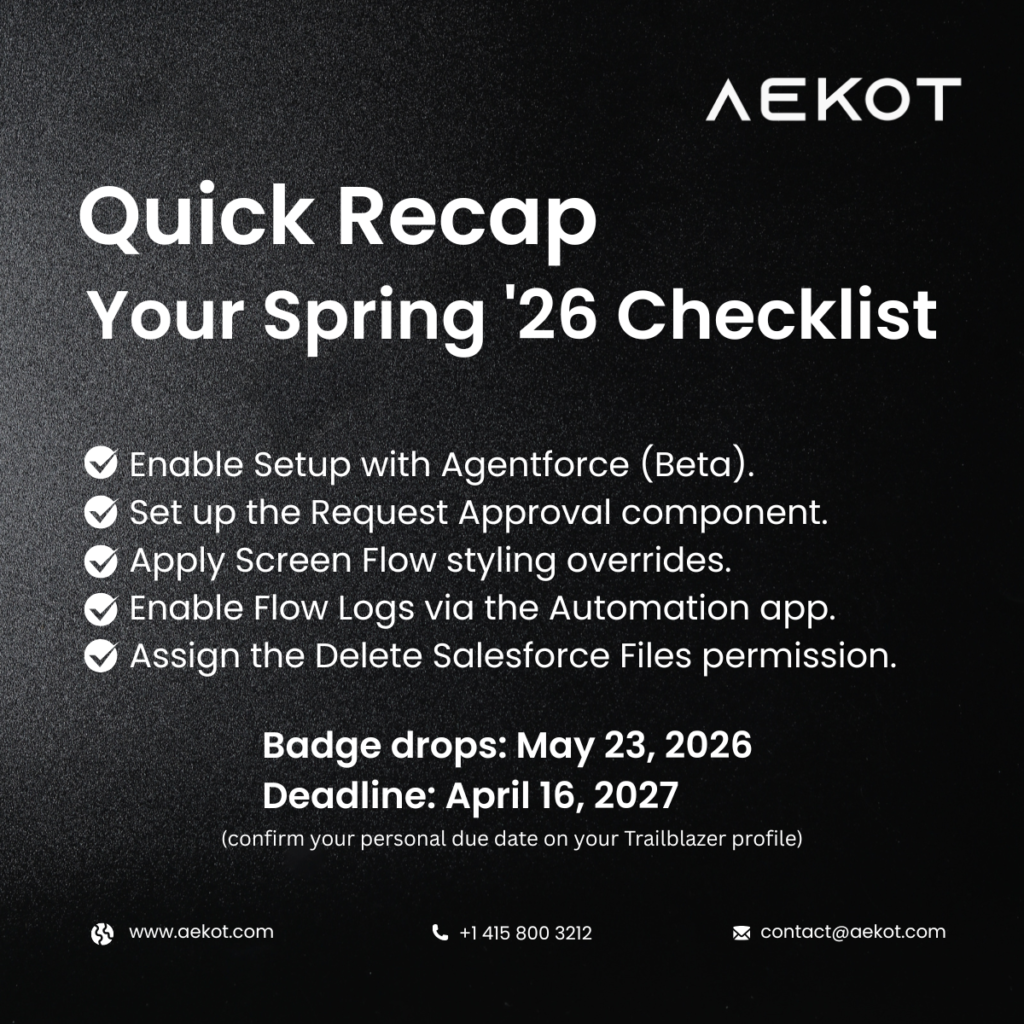
Salesforce Spring ’26 maintenance badges drop on May 23, 2026

Action 1 – Enable Setup with Agentforce ⚠️ Beta Administrative work often requires jumping between Setup pages, documentation, and metadata views. Setup with Agentforce reduces this friction by allowing admins to chat directly with an AI-powered agent to ask questions, issue commands, and troubleshoot issues – without needing to go back and forth between pages. What to do: To enable Setup with Agentforce, you must have the Customize Application and Data Cloud User permission set. To access Setup with Agentforce, users must have the Use Setup with Agentforce AND Execute Prompt Template permissions, as well as access to the Data 360 default data space, the Data Cloud User permission set, and required permissions to perform the task they’d like to perform. Steps: Setup → Quick Find → Agentforce → Select Setup with Agentforce (Beta) → Turn on → Refresh browser. Beta feature. Available in Lightning Experience – Enterprise, Performance, Unlimited, and Developer editions with Foundations or Agentforce 1. Action 2 – Add Approval Submissions to Record Pages Without Custom Buttons The Request Approval component lets you submit records for approval directly from record pages – no custom buttons required. It integrates with autolaunched flow approval processes, allowing approval submissions to feel native, consistent, and easier to maintain across your org. What to do: Works only with flow approval processes. Classic approval processes are not supported. Action 3 – Tailor Screen Flows with Component-Level Styling Overrides Salesforce now lets Platform Administrators apply component-level styling overrides in Screen Flows, making it easier to deliver visually consistent and audience-specific flow experiences – without sacrificing maintainability or relying on global themes. What to do: Fully declarative – no custom CSS or code required. Available across Lightning Experience, Salesforce Classic, Aura, LWR, and Visualforce sites. Action 4 – Set Up and Monitor Flow Logging in One Place The Flow Logs tab centralizes Flow logging and monitoring, making it easier to understand performance, spot issues and bottlenecks, monitor enabled flows, and make more informed decisions when optimizing or troubleshooting automation. Flow logging is powered by Data 360, which collects and stores flow execution metrics. What to do: Available in Lightning Experience – Essentials, Professional, Enterprise, Performance, Unlimited, and Developer editions. Action 5 – Allow More Users to Delete Files The Delete Salesforce Files permission gives Platform Administrators a simple, fast way to extend file management capabilities beyond admins and file owners. This permission allows users to delete any file they can view, rather than limiting deletion to admins or file owners. The feature was developed in response to customer feedback on IdeaExchange. What to do: Applies across Lightning Experience and Salesforce Classic – Essentials, Group, Professional, Enterprise, Performance, Unlimited, Contact Manager, and Developer editions. Need help rolling these out in your org? Aekot’s certified Salesforce consultants are here to help. 📩 contact@aekot.com | 🌐 www.aekot.com | 📞 +1 415 800 3212

May 07, 2026

Blog Poster

Salesforce Summer ’26 Release: What’s New and What Needs Action

Introduction If you’ve been around Salesforce long enough, you know that some releases feel like maintenance windows with a press release attached. Summer ’26 is not one of those. There’s real substance here – particularly for teams who live in Flow Builder, Apex developers who care about security, and anyone who has ever lost an afternoon chasing a broken Email Template reference after a sandbox deployment. Salesforce is calling the direction here the Agentic Enterprise. The idea is that AI agents and human teams work together on the same platform, with Salesforce doing the coordination instead of your team doing it manually. You’ll see it shows up across Flow, developer tooling, and a new release channel system that gives teams earlier visibility into what’s coming. At Aekot, we’ve been going through the release notes and testing features in pre-release orgs since they opened up. This article is our practical read on what’s actually worth your attention, organized by area, with an honest view of what each change means on the ground. Note: Just a heads up on the Summer ’26 release dates – worth knowing before your team makes any assumptions. Production upgrades roll out across three separate weekends: May 8, June 5, and June 12–13, 2026. May 8 is the first wave for early production instances, not a sandbox date. Sandboxes are targeted for upgrade around May 9, so the two are close but not the same thing. Which date applies to your org depends entirely on your specific Salesforce instance – there’s no single go-live date for everyone. The quickest way to check is trust.salesforce.com – search by your instance name or domain, select Maintenance, and it’ll show you exactly when your org is scheduled to upgrade. Agentforce and the Agentic Enterprise Salesforce: The Agentic Enterprise isn’t a product name. It’s how Salesforce thinks about the work going forward: admins and developers set the intent, agents do the execution, and ideally, nobody has to manually wire the two together. Example:An admin types: ‘Add a required email field after the Name input and remove the Notes section.’ Agentforce reads the existing flow structure and automatically applies the requested changes. For teams managing a large library of screen flows, this is a real time saver. It won’t replace the need for someone who understands flow logic, but it removes a lot of the manual clicking for routine modifications. Worth noting: this feature requires Foundations or Agentforce 1 editions, and you’ll need Data 360 provisioned and Einstein generative AI enabled before you can use it. If you’re not sure whether your org qualifies, check with your account executive before building workflows around it. What the Agentic Enterprise means for your org: The practical implication is straightforward: the platform is getting better at handling configuration work that previously required a trained admin to do manually. That doesn’t make admins less valuable. If anything, it shifts where their value lies – away from repetitive edits and toward the design decisions that actually require judgment. The teams we work with that are getting the most from Salesforce are already thinking this way. Before this, building date-relative logic in a flow meant creating formula resources, referencing them in your decision conditions, and hoping the next person who looked at the flow could figure out what you were doing. These operators bring that logic directly into the Decision element itself. Worth noting: this applies to Date data types only, not DateTime. Keep that in mind if you’re working with timestamp fields. The numbers are straightforward: If your flow needs to process 7 records and you set a maximum batch size of 2, Salesforce automatically runs 4 batches. Smaller batches reduce governor limit risk in high-volume scenarios, but setting the value too low will increase overall processing time – so there’s a calibration exercise to do based on your specific flow’s complexity and volume. Summer ’26 fixes this. In the Send Email Action, you can expand the “Show advanced options” section and set the Action Version to 3.0.1 or higher. This new version of the action preserves the template reference correctly across environments, so your deployments stop breaking email flows. If you’re currently using Email Templates in Send Email Actions, updating the action version in your sandbox before your next deployment is worth doing proactively. Summer ’26 Flow updates at a glance Release channel tiers:Standard, Accelerated, and Dev Salesforce has introduced a beta opt-in feature called Salesforce Release Manager, which gives development teams structured access to upcoming features before they land in a major release. It operates across three channels: This replaces having to rely entirely on pre-release orgs or community previews to understand what’s coming. For developer teams who want to test compatibility ahead of a release, opting into the Accelerated channel in particular is worth exploring. Action Required: If your org has Apex using WITH_SECURITY_ENFORCED, plan to migrate those queries to explicit user mode before moving to API v67. Test in a sandbox first – the sharing and field-level access changes can surface exceptions in code that previously ran without issue. If you’ve ever built a complex multi-component app in LWC, you’ll know the pain of threading data through five levels of nested components just to get a value where it actually needs to be. It gets messy fast, it’s hard to debug, and adding one new component usually means rewiring things you’d rather not touch. That’s exactly the problem LWC State Management is designed to solve – and in Summer ’26, it moves further along the road to general availability, though Salesforce’s official documentation still classifies it as beta. It’s worth getting familiar with now, but treat it accordingly in production. The idea is straightforward: instead of passing data through parent-child chains or firing events up and down the component tree, you create a state manager – a dedicated JavaScript module that holds your application’s shared data and the logic to update it. Any component that needs that data connects directly to the state manager, regardless of where it sits in the hierarchy. Under the hood, state managers are built around two core concepts. Atoms are reactive containers – each one holds a single piece of data, and when it changes, every component watching it updates automatically. Computed values sit on top of atoms and derive new values from them, recalculating whenever their dependencies change. You wire everything together using the defineState function from @lwc/state, and the framework handles the reactivity from there. Worth clarifying: this is not a replacement for Lightning Message Service. LMS still makes sense for communication between completely unrelated components across different pages or namespaces. State management is the better fit when multiple components within the same app share and update data, and you want that coordination to happen cleanly – no custom event chains, no prop drilling, no guesswork. If you’re building anything beyond a handful of LWCs that share state, this is worth learning before your next project starts. The official GitHub examples repo is the best starting point – the simple state manager example covers the basics well, and the nested example shows how to compose state managers for more complex scenarios. This one is in pilot, so not everyone can use it yet – but it’s worth knowing about because it solves a problem that has forced unnecessary complexity into Apex code for years. Right now, if you want to filter records based on a calculated value – comparing two fields with arithmetic between them, for example – your options aren’t great. You can create a formula field on the object and query against that. You can pull a broader dataset and filter in Apex after the fact. Or you write some workaround logic that the next developer on the project will have to piece together. All of these add overhead – either in metadata, in governor limit consumption, or in code that shouldn’t need to exist. Summer ’26 introduces a FORMULA() function you can use directly in the WHERE clause of a SOQL query. Instead of pulling records broadly and filtering afterwards, you run the calculation inline and get back exactly the records you need. Fewer records returned means fewer rows against governor limits, leaner Apex, and queries that are easier to read and maintain at a glance. Because this is a pilot, access isn’t automatic – you’ll need to reach out to your Account Executive or Customer Success Manager to get enrolled. Documentation is limited at this stage, which is normal for pilot features. But given how frequently developers hit this wall, it’s one to watch closely and worth getting into early if you can. If you’re on the pilot, test against realistic data volumes in the sandbox before it goes anywhere near production, and keep an eye on query performance with larger object datasets. Tighter permission controls:The three permission updates in Summer ’26 that don’t get enough attention. No migration required for any of these. They’re just better ways of doing things you’re already doing. Closing Thoughts: Summer ’26 is a well-constructed release. The Flow improvements alone – the date operators, batch size control and email template persistence – fix problems that Salesforce practitioners have been working around for years. The Agentforce Screen Flow editing is genuinely useful rather than just a demonstration of capability. And the API v67 security changes make Apex code more secure by default, which is overdue, even if they require some preparation work beforehand. The features that need action before they land are clear: WITH_SECURITY_ENFORCED in Apex, Email Template action versions in flows, and the release update enforcements in Setup. Everything else is an upgrade you can explore in your sandbox and adopt at your own pace. At Aekot, we’re working with clients on Summer ’26 readiness assessments and sandbox testing right now. If you’ve got Apex on API v66 or lower, flows using Email Templates, or a high-volume automation you’re not sure about – those are the places to start. Drop us a message at www.aekot.com, and we’ll take a look at what applies to your org specifically. About Aekot Consulting:Aekot is a Salesforce consulting partner with a strong focus on North American businesses. We provide end-to-end Salesforce services – from initial strategy and implementation through to customisation, integration, and ongoing support – across Sales Cloud, Service Cloud, Marketing Cloud, and Tableau. Our team of certified consultants and developers is committed to delivering measurable outcomes and staying current with every Salesforce release. Contact us:📩 contact@aekot.com 🌐 www.aekot.com 📞 +1 415 800 3212 #Salesforce #SalesforceAdmin #Agentforce #Summer26 #SalesforceDeveloper#SalesforceRelease #Release26 #Summer

May 06, 2026

Blog Poster

Salesforce Headless 360: The End of the Browser – First Era

Overview Last month, Parker Harris stood in front of a room full of press and analysts and said something that caught everyone off guard. “Why should you ever log into Salesforce again?” Coming from the co-founder of a platform that hundreds of thousands of businesses log into every single day – that’s not a throwaway line. That’s a signal. It turned out to be the opening act for what Salesforce announced at TrailblazerDX 2026 on April 15 in San Francisco. The announcement was called Salesforce Headless 360, and if you run your business on Salesforce – or you’re thinking about it – this is one of those moments worth pausing on. So What Actually Changed? For most of Salesforce’s history, the platform worked one way. You opened a browser, found your record, clicked through the screens, and did your work. Everything happened inside the UI. That was just the deal. Headless 360 breaks that assumption entirely. What Salesforce has done is expose its entire platform – every workflow, every piece of business logic, every data model built over 25 years – as something that can be called programmatically. An API. An MCP tool. A CLI command. Your AI agents, your coding tools, and your external systems can now reach into Salesforce and act on it directly. No browser. No human navigating screens. Think about what that actually means in practice. A sales rep logging a call. A service agent updating a case. A manager is pulling a weekly report. Every one of those actions – currently done by a human sitting inside Salesforce – can now be handled by an AI agent running in the background. Your people get their time back for the decisions that actually need a human. That’s not a feature update. That’s a different kind of platform. The Three Things Headless 360 Actually Delivers Salesforce has shipped 60+ new MCP tools and 30+ preconfigured coding skills. If your developers work in Claude Code, Cursor, Codex, or Windsurf, they now have full, live access to your Salesforce org from inside those tools. Data, workflows, business logic – all of it, without switching context into a Salesforce UI. For development teams, this is a genuinely significant unlock. A new layer called the Agentforce Experience Layer means agents can surface interactions natively in Slack, WhatsApp, voice, and mobile – without sending anyone back to a browser tab. You build the experience once. It renders wherever your team works. This is the pillar that gets the least attention but matters most in production. Salesforce has built a governance layer that includes session tracing, testing centres, and custom scoring evaluations. You can define what “correct” looks like for your specific use case – and measure agent behaviour against that standard before and after go-live. For any organisation worried about agents going rogue in a production environment, this is the layer that makes deployment responsible. The four layers that underpin all of this: Data 360 gives agents the context they need. Customer 360 gives them the workflows to act on. Agentforce manages how they operate. And Slack is where humans and agents come together to get work done. One layer that deserves more than a passing mention here is Agent Fabric. It sits across your entire agentic environment and handles automated discovery, centralised LLM governance, and monitoring dashboards that give you visibility into every agent handoff and model decision – with optimisation across cost and risk built in. The concept is exactly right. How it performs in production at scale is what we’ll be watching closely over the next few months. Why This Is a Business Story, Not Just a Tech Story We’ve seen plenty of platform announcements that are exciting for developers and largely irrelevant to business leaders. This one is different. The question worth asking isn’t “what new features did Salesforce ship?” It’s “how much of my team’s working week is spent navigating Salesforce instead of making decisions?” For most organisations, that number is uncomfortably high. Logging calls. Updating records. Generating reports. These are tasks that carry real labour costs and no strategic value. Headless 360 is Salesforce’s answer to that problem. It’s not perfect yet – we’ll get to that – but the direction is clear, and the businesses that start thinking about it now will be better positioned than those who wait. Six More Announcements Worth Your Attention: Headless 360 was the headline at TDX 2026, but it wasn’t the only significant news. These announcements complete the picture. Salesforce has unified its AppExchange, Slack Marketplace, and Agentforce ecosystem into a single platform called AgentExchange. It brings together roughly 10,000 Salesforce apps, 2,700 Slack apps, and 1,000+ Agentforce agents, tools, and MCP servers – all searchable and deployable in one place. A new $50 million Builders Fund backs partners building within the ecosystem. For businesses, the practical implication is straightforward. Rather than commissioning custom builds for every workflow you want to automate, you can browse a catalogue of pre-built, pre-certified agents designed for your industry and use case. That lowers the barrier to getting started considerably.One more thing worth noting: Salesforce also announced integration with ChatGPT, putting Agentforce within reach of consumer AI surfaces most people already use daily. Details are still limited, but the direction is consistent with everything else at TDX – meet users where they already are, not where the platform wants them to be. If Headless 360 is the infrastructure, Agentforce Vibes 2.0 is the development environment sitting on top of it. The meaningful upgrade here is multi-model support – Claude Sonnet 4.5 is the default coding model, and developers can build using either the Anthropic or OpenAI agent SDK depending on their needs. More importantly, Vibes 2.0 understands your org’s specific data model and existing code patterns. It’s not a generic AI assistant – it knows what your objects mean and how your business has configured them. That’s a practical difference. It also introduces two distinct operating modes. Plan Mode proposes changes before executing them – useful when you’re working in a production environment and want to review before anything runs. Act Mode executes directly, built for faster iteration in sandboxes. Choosing between them thoughtfully will save teams a lot of pain. Every Salesforce Developer Edition org now includes the Agentforce Vibes IDE and Salesforce Hosted MCP Servers at no cost – 110 requests and 1.5 million tokens per month, available through May 31, 2026. No budget sign-off required. No procurement process. Just a Developer Edition org and a few hours. If your team has been curious about agentic Salesforce development but hasn’t found a low-stakes way to explore it, this is that opportunity. Use it before the free allocation runs out. Salesforce Multi-Framework is now in open beta, and it deserves more attention than it got in the TDX coverage. For the first time, developers can build native React apps directly on the Agentforce platform – using GraphQL, Apex, and Salesforce’s built-in security model – without stitching together a separate front-end stack. The connection to Agentforce Vibes is what makes this practical rather than just interesting. You describe what you need – say, a dashboard showing open Opportunities by stage – and Vibes generates the React code, GraphQL queries, and Salesforce metadata. Live Preview updates in real time as you build. Templates handle the scaffolding. For teams that have spent years choosing between a custom front-end experience and staying inside native Salesforce functionality, this closes a gap that’s caused a lot of unnecessary compromise. This one moved quietly in the TDX noise, but it’s worth slowing down on. Informatica – one of the most recognised names in enterprise data management – is now inside the Salesforce ecosystem. What that actually means in practice: data integration, data quality, governance, access and privacy controls, and master data management are now part of the same platform your agents are running on. The data that those agents act on can be cleaned, governed, and certified without routing through a separate set of tools managed by a separate team. For any organisation where data quality has been the quiet reason AI initiatives stall before they start, this changes the conversation. If you have developers who want to get ahead of the roadmap, Agentforce Labs is worth knowing about. It’s where Salesforce’s product and engineering teams ship unreleased tools, open-source projects, and early AI research — specifically for external builders to test and give feedback on before anything goes GA. It’s not a production resource. But if your team has the appetite for it, it’s probably the most direct line of influence you’ll have over where Agentforce goes next. Not everything from TDX 2026 is straightforward good news. Industry analysts – including the team at SalesforceDevops.net who first named this pattern – have highlighted what they’re calling a widening “Builder Gap.” The reality is that Headless 360, MCP tools, Agent Script, and the broader agentic toolkit are firmly in pro-code territory. The Salesforce ecosystem was built by admins, declarative builders, and low-code professionals who never needed to understand API architectures or CLI pipelines. Those people were not the audience at TDX 2026. Flow Builder and point-and-click customisation were absent from the keynote narrative. If your Salesforce team is primarily admin-led, the path to taking advantage of Headless 360 involves a real skills investment – whether that’s training, hiring, or bringing in a partner who can bridge the gap. We’d rather you hear that now than discover it mid-project. Our Honest Read on This We’re genuinely excited about where Salesforce is heading. But we also believe our clients deserve a complete picture, not just the headline. A few things to think carefully about before making architectural decisions: None of these concerns diminishes what was announced. They’re just the questions a responsible partner asks before helping a client build on something new. What Should You Actually Do Now? If you’re already on Salesforce, this is the moment for a strategic conversation about your roadmap – not your feature list.The right questions aren’t about what Headless 360 can do. They’re about what your organisation is ready for: These are the conversations we have with our clients every day. They’re not always comfortable, but they’re the ones that lead to outcomes that actually hold up. The Bottom Line Salesforce Headless 360 is one of the most significant changes to the platform in its 25-year history. It moves Salesforce from a place people navigate to, to infrastructure that operates on your behalf – across every surface, with or without a browser. The AgentExchange marketplace, Agentforce Vibes 2.0, the free Developer Edition, and a raft of supporting announcements make this more accessible than any previous wave of Salesforce innovation. But the Builder Gap is real, pricing clarity is still outstanding, and several features aren’t fully GA yet. The businesses that approach this thoughtfully – rather than reactively – will be the ones that get ahead. Thinking about what Headless 360 means for your organisation? We’re helping businesses across the region work out where agentic Salesforce fits into their strategy – and where it doesn’t. Let’s have that conversation. 📩 contact@aekot.com 🌐 www.aekot.com 📞 +1 415 800 3212 #Salesforce #AgenticAI #HeadlessSalesforce #TrailblazerDX #CRM #DigitalTransformation #AIStrategy #MCP #Agentforce #SalesforcePartner

May 01, 2026

Blog Poster

Next-Gen Wealth Management: Enabling Omnichannel Advisory with Salesforce

However, many wealth firms are still held back by legacy systems, fragmented data, manual processes, and siloed communication. These limitations not only affect client satisfaction but also reduce advisor productivity and increase compliance risks. Salesforce, particularly Financial Services Cloud (FSC), provides wealth management businesses with the digital backbone for delivering personalized, compliant, and omnichannel advisory at scale. And with Aekot’s Salesforce implementation strategy — backed by deep BFSI experience — firms gain a unified, scalable, and regulator-ready platform for managing the entire advisory lifecycle. This blog explores how Salesforce transforms omnichannel advisory for wealth firms and how Aekot helps organizations get there. Many wealth advisors rely on scattered notes, outdated systems, spreadsheets, and manual follow-ups. Without unified visibility, advisory becomes reactive rather than proactive. Salesforce FSC consolidates: Key Features: Tips for Implementation: This improves advisor productivity and strengthens client trust. Clients interact on multiple channels. RMs often lose context when conversations move from email to text to calls. Salesforce creates continuity across: Key Features: Tips to Maximize Value: RMs spend too much time preparing for meetings, gathering context, and writing follow-up notes. AI and automation reduce effort and improve quality: Features to Leverage: Tips: KYC, suitability, and documentation processes often slow down advisory and create room for error. Salesforce embeds compliance into every step: Tips: Omnichannel advisory is no longer a differentiator — it’s the new standard. Wealth management firms that modernize now will create deeper client relationships, ensure regulatory readiness, and operate with greater efficiency. Salesforce Financial Services Cloud, combined with Aekot’s expertise as a CRM consulting company in India/UAE/US, provides the ideal foundation to build a scalable, compliant, and client-centric advisory platform. To modernize your wealth advisory experience, contact Aekot today.


December 02, 2025